
Membership Plans
Membership Plans helps you run a service club or maintenance membership program inside ToolbagCRM. Use it to define membership tiers, enroll customers, track included visits, and watch recurring revenue from monthly or annual members.
Open Membership Plans from the main navigation after the plugin is enabled in Settings → Features.
When to use Membership Plans
Use this plugin when your business offers plans such as:
- HVAC comfort club memberships,
- plumbing or electrical priority-service plans,
- annual inspection programs,
- pest-control or lawn-care service memberships, or
- any customer plan with included visits, discounts, or priority scheduling.
Membership Plans is focused on the membership record itself: the plan, enrolled customer, renewal date, visit usage, and membership status.
Create your service plans
Each plan can include:
- a plan name and customer-facing description,
- a monthly price, annual price, or both,
- included visits per year,
- a repair or service discount percentage,
- a priority scheduling flag,
- whether the plan is active for new enrollments, and
- internal notes for your team.
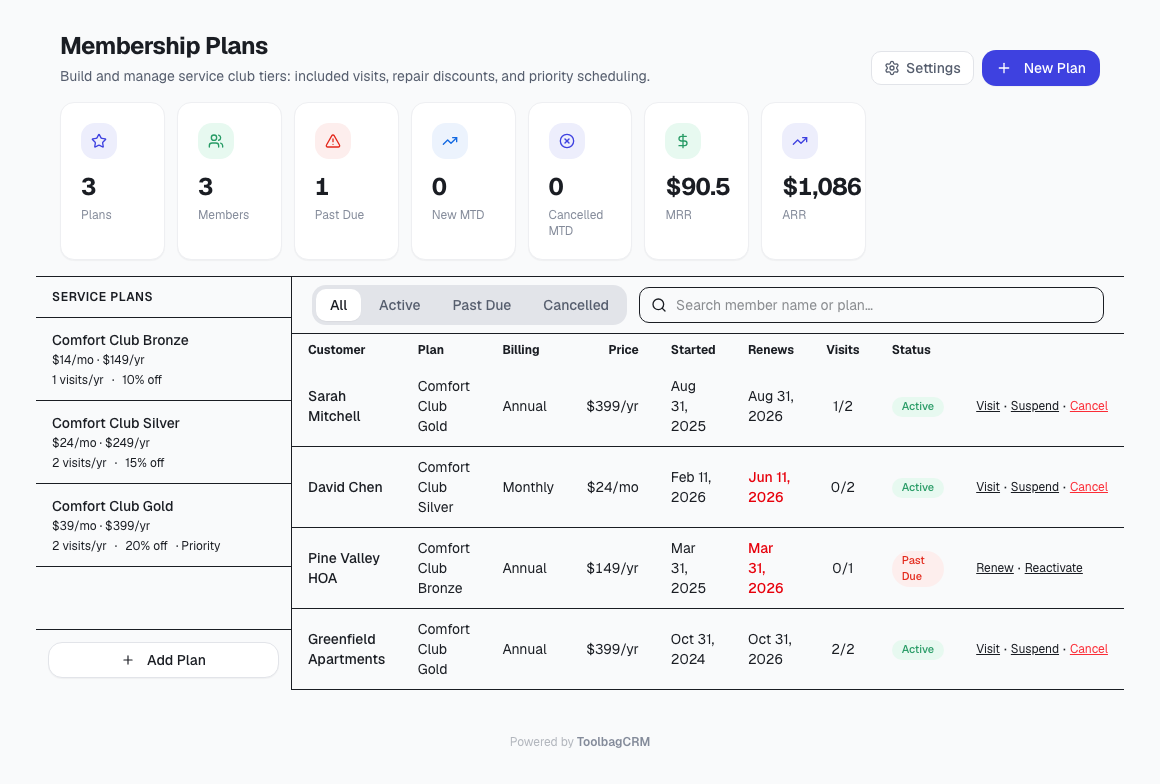
Plans are shown in the left side of the Membership Plans page. Inactive plans remain visible for history, but should not be used for new enrollments.
Enroll customers
After you create a plan, select Enroll Customer to add a customer to that plan. An enrollment records:
- the customer name,
- monthly or annual billing cycle,
- the price for that customer,
- the membership start date, and
- optional notes.
ToolbagCRM sets the next renewal date from the start date: one month later for monthly memberships or one year later for annual memberships. If needed, you can override the enrollment price while keeping the customer tied to the same plan.
Track members and renewals
The Membership Plans page includes tabs for All, Active, Past Due, and Cancelled enrollments. Use the search field to find members by customer name or plan name.
For each enrollment, the table shows:
- customer and plan,
- billing cycle and price,
- start date,
- next renewal date,
- visits used out of included visits,
- status, and
- quick actions for the membership lifecycle.
Renewal dates that are soon or overdue are visually highlighted so your team can spot memberships that need attention.
Record membership activity
Use the row actions to keep each enrollment current:
- Visit increments the member's used-visit count.
- Suspend pauses member benefits until reactivated.
- Cancel changes the membership to cancelled and removes benefits immediately.
- Renew advances the renewal date by one billing cycle and resets the included-visit count.
- Reactivate returns a cancelled or suspended membership to active status.
Plans that already have enrollments cannot be deleted. Deactivate a plan instead when you need to stop offering it while preserving member history.
Review membership performance
Summary cards at the top of the page show:
- active plans,
- active members,
- past-due memberships,
- new enrollments this month,
- cancellations this month,
- monthly recurring revenue, and
- annual recurring revenue.
Use these totals to understand whether your service club is growing, how much recurring revenue it represents, and which members may need renewal follow-up.
Configure membership defaults
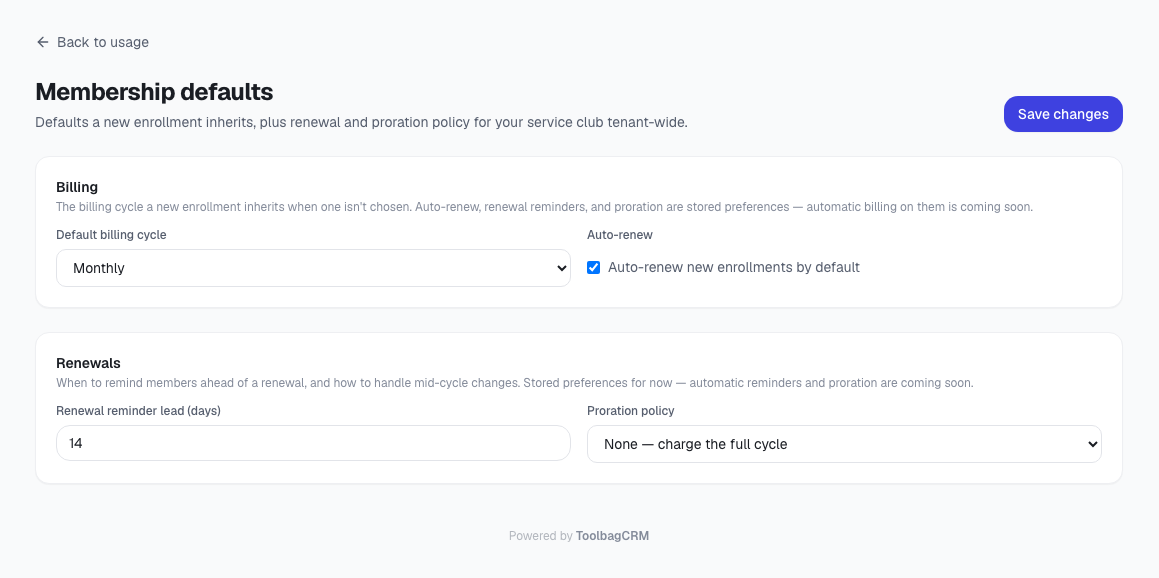
Open the plugin settings from Membership Plans to manage tenant-wide membership defaults. Current settings include:
- default billing cycle for new enrollments,
- whether new enrollments default to auto-renew,
- renewal reminder lead time in days, and
- proration policy for mid-cycle changes.
Today, the default billing cycle is used when a new enrollment does not specify monthly or annual billing. Auto-renew, renewal reminder, and proration are stored as policy settings for your account, but automatic billing, automatic reminder sending, and automatic proration are not yet handled by the plugin.
If the page says the plugin is disabled
Open Settings → Features and enable Membership Plans. Membership Plans depends on customer records, but you can start by creating plan tiers before enrolling customers.